Mastering Email Automation Workflows: A Complete Guide for Businesses
- Dec 13, 2025
- 6 min read
Email automation has become a game-changer for companies looking to connect with customers more efficiently. In today's fast-paced world, where people check their inboxes multiple times a day, setting up smart email systems can save time, boost sales, and build stronger relationships. This guide dives deep into everything you need to know about email automation workflows. Whether you're a small business owner in New York starting out or a marketing pro in California scaling up, you'll find practical tips, step-by-step instructions, and real-world examples to help you get started.
We'll cover the basics, explore advanced strategies, and share insights tailored for the American market. With over 300 million email users in the US alone, mastering this can give your business a real edge. Let's break it down into easy-to-follow sections so you can jump to what interests you most.

What Is Email Automation?
Email automation is like having a smart assistant that sends messages on autopilot. Instead of manually emailing every customer, you set up rules and triggers that do the work for you. Or if a shopper abandons their cart on your online store, a reminder pops into their inbox.
In simple terms, it's using software to create sequences of emails based on user actions or schedules. This isn't new—businesses have been doing it for years—but with tools getting better, it's easier than ever. Think of it as the email version of a conveyor belt in a factory: efficient, consistent, and scalable.
Why does this matter for US businesses? Americans love convenience. A study from a leading marketing firm shows that personalized emails get opened 29% more often. In a country where e-commerce sales hit $1 trillion last year, automating your emails can mean more revenue without extra effort.
The History of Email Automation
Email itself started back in the 1970s, but automation kicked off in the early 2000s with platforms like Constant Contact. Fast forward to today, and giants like Amazon use it to send millions of targeted messages daily. In the US, regulations like CAN-SPAM Act from 2003 ensure emails are legal and respectful, which we'll touch on later.
Over the years, technology has evolved. From basic autoresponders to AI-driven personalization, it's come a long way. For instance, in 2010, only a few companies used segmentation; now, it's standard. This shift has helped American brands like Nike and Starbucks stay ahead by delivering timely, relevant content.
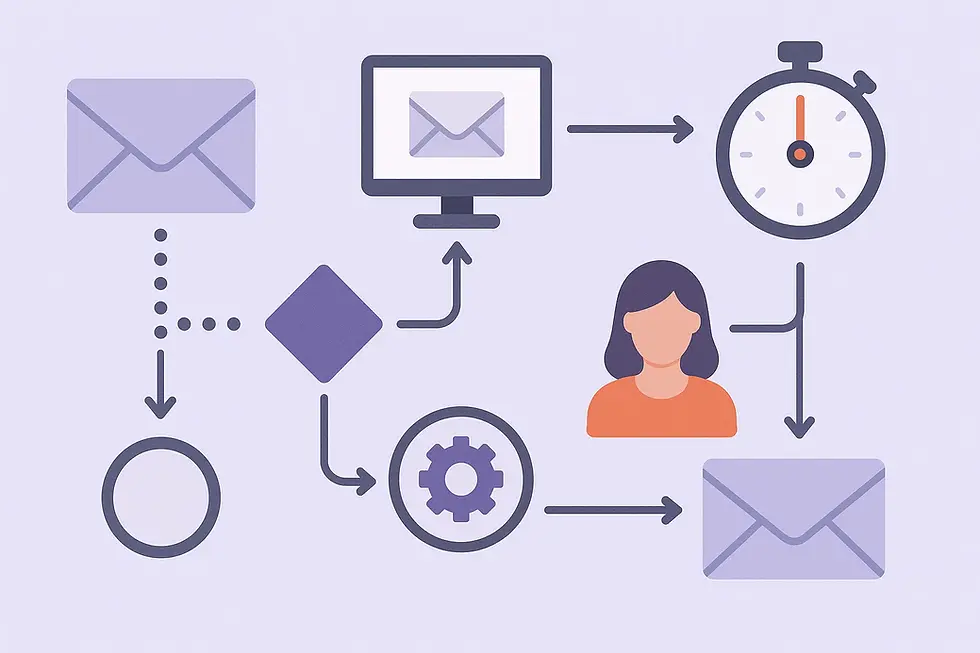
Key Components of an Email Automation Workflow
Every workflow has core parts:
Triggers: These start the email sequence. Common ones include sign-ups, purchases, or birthdays.
Conditions: Rules that decide what happens next, like "if the user is from Texas, send a local offer."
Actions: The emails themselves, plus things like updating customer data.
Delays: Pauses between emails to avoid overwhelming recipients.
Exits: Ways for users to stop the sequence, like unsubscribing.
Understanding these helps you build workflows that feel natural, not robotic.
Why Use Email Automation for Your Business?
In a busy market like the US, where competition is fierce, email automation stands out. It saves time—marketers report up to 80% less manual work. Plus, it increases engagement: automated emails have click rates 152% higher than regular ones.
For small businesses in places like Chicago or Miami, this means competing with big players without a huge team. Imagine a coffee shop in Seattle automatically sending loyalty rewards—customers feel valued, and sales go up.
Benefits for Sales and Revenue
Automated emails drive purchases. Cart abandonment sequences recover 10-15% of lost sales on average. For e-commerce sites, welcome series can boost revenue by 30%. In the US, where online shopping is booming, this translates to real dollars.
Take holiday campaigns: Set up Black Friday deals in advance, and watch the influx. Or nurture leads with educational content, turning browsers into buyers.
Improving Customer Relationships
Personalization is key. Americans expect tailored experiences—73% say they'll switch brands if it's not. Automation lets you send birthday wishes or product recommendations based on past buys.
It also builds trust. Consistent communication keeps your brand top-of-mind. For service-based businesses like real estate agents in Florida, follow-up emails can close deals faster.
Cost Savings and Efficiency
Manual emailing is time-consuming. Automation tools handle it for pennies per send. ROI is high: For every $1 spent, email marketing returns $42 on average in the US.
Scalability is another win. As your list grows from 100 to 10,000 subscribers, the system handles it without extra staff.
Compliance and Legal Perks
In the US, following laws like CAN-SPAM protects your business. Automation software often includes built-in compliance features, like easy unsubscribe links.
Choosing the Right Email Automation Tool
With so many options, picking one can feel overwhelming. Focus on features that match your needs, like ease of use, integrations, and pricing.

Popular Tools for US Businesses
Mailchimp: Great for beginners. Free for small lists, with drag-and-drop builders. Integrates with Shopify, perfect for e-commerce in states like Texas.
ActiveCampaign: Advanced automation with CRM features. Ideal for mid-sized firms in New York needing detailed tracking.
HubSpot: All-in-one marketing hub. Free CRM, but paid for full automation. Suited for B2B companies in Silicon Valley.
Klaviyo: E-commerce focused. Uses data for hyper-personalization, boosting sales for online stores nationwide.
ConvertKit: For creators and bloggers. Simple sequences, popular among solopreneurs in creative hubs like Los Angeles.
Compare based on your size: Startups might start free, while enterprises need robust analytics.

Factors to Consider When Selecting a Tool
User Interface: Easy to navigate? Test demos.
Integrations: Connects to your website, CRM, or payment systems?
Pricing: Starts at $0-$20/month for basics, up to $100+ for advanced.
Support: US-based help? 24/7 chat?
Analytics: Track opens, clicks, conversions?

Read reviews from sites like G2 or Capterra for real user feedback.
Setting Up Your First Tool
Sign up, verify your domain, import contacts. Most have tutorials—follow them step by step.
Building Your First Email Automation Workflow
Let's get hands-on. Start simple: A welcome series for new subscribers.
Step 1: Define Your Goal
What do you want? Introduce your brand, offer a discount, or gather info?
For a US fitness brand, goal might be encouraging first purchase with a 10% off code.
Step 2: Map the Workflow
Use a flowchart. Trigger: Form submission. Then: Send welcome email. Delay 2 days. Send tip email. If no open, send reminder.
Tools have visual builders—drag elements into place.
Step 3: Create Content
Write engaging emails.
Body: Short, friendly. Include images, calls-to-action.
Step 4: Set Triggers and Conditions
In your tool, select "new subscriber" as trigger. Add conditions like location-based for US states.
Step 5: Test and Launch
Send test emails to yourself. Check mobile view—Americans use phones for 50% of emails.
Launch, monitor, tweak.
Best Practices for Email Automation
To succeed, follow proven tips.
Keep It Personal
Use names, past behavior. "Hey John, loved your recent purchase—here's something similar."
Timing Matters
Send when open rates are high: Tuesdays-Thursdays, 10 AM-2 PM EST for US audiences.

Mobile Optimization
Ensure emails look good on phones. Use responsive designs.
A/B Testing
Test subjects, content. See what works for your audience.
Avoid Spam Filters
Clean lists, relevant content. Follow US laws.
Segment Your List
Group by location, interests. East Coast vs. West Coast preferences differ.

Advanced Email Automation Strategies
Once basics are down, level up.
Drip Campaigns
Series of emails over time. For education, like a 7-day course on home improvement for DIYers in the Midwest.
Behavioral Triggers
Based on actions: Viewed product? Send details.
Re-engagement Sequences
For inactive subscribers: "We Miss You" with incentives.
Integration with Other Tools
Link to Google Analytics for deeper insights. Or Zapier for custom flows.
AI and Personalization
New tools use AI to predict best send times, content.

Case Studies from US Businesses
Learn from success stories.
E-commerce Giant: Amazon
Uses automation for recommendations, shipping updates. Results: Billions in sales.
Small Business: A Texas Bakery
Set up birthday emails. Saw 20% repeat customers increase.
B2B Example: A California Tech Firm
Lead nurturing workflow closed 15% more deals.
Nonprofit in Chicago
Donation reminders boosted funds by 25%.

Common Mistakes to Avoid
Don't over-email—leads to unsubscribes. Always provide value. Ignore analytics at your peril.
Poor design hurts opens. Not testing across devices is a no-no.
Measuring Success in Email Automation
Track key metrics: Open rate (aim 20-30%), click rate (2-5%), conversion rate.
Use tool dashboards. Set goals, review monthly.
Scaling Your Email Automation
As you grow, add complexity. Hire specialists or use agencies.
Integrate with SMS for multi-channel.

Future Trends in Email Automation
Look for more AI, interactive emails (polls, carousels). Privacy focus with laws like CCPA in California.
Video embeds, hyper-personalization.
Email Automation for Specific Industries
Retail and E-commerce
Cart recovery, upsells.
Real Estate
Property alerts for buyers in hot markets like Florida.
Healthcare
Appointment reminders, compliant with HIPAA.
Finance
Account updates, fraud alerts.
Education
Course enrollments, alumni news.

Legal Considerations for US Businesses
Comply with CAN-SPAM: Include address, unsubscribe.
GDPR for international, but focus on US rules.
Troubleshooting Common Issues
Low opens? Improve subjects.
Bounces? Clean lists.
Tech glitches? Check support.
Resources for Learning More
Books: "Email Marketing Rules" by Chad White.
Courses on Udemy, Coursera.
Blogs from tools' sites.
Conclusion: Get Started Today
Email automation workflows transform how you communicate. Start small, iterate, and watch your business grow. For US companies, it's a must in this digital age.


Comments